Made with this app
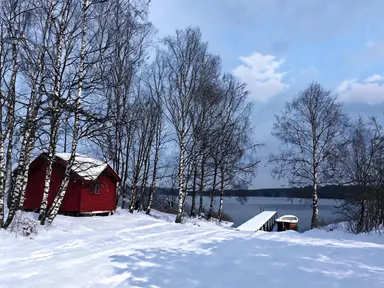
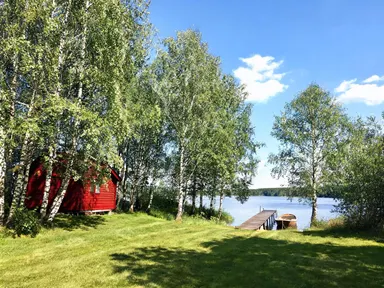
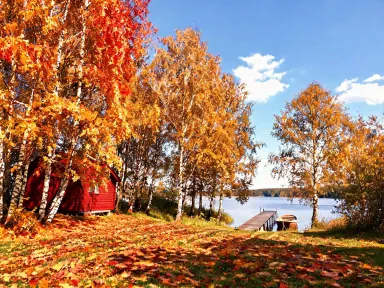
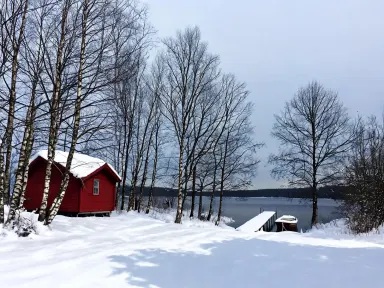
AI Season Changer takes one outdoor photograph and returns the same place in a different season. The trees, buildings, people and ground stay exactly where they are; what changes is what the season does to all of it: the leaves, the fallen debris, the snow or frost, the quality of light and the colour of shadows. It is made for photographers, real estate marketers, travel bloggers and anyone who needs to show a place across the calendar without returning to it in every season.
How to use this app
- 1
Upload your file. There is no prompt you have to write.
- 2
Pick a look from the visual library, add a note of your own if you want one, then press Generate.
- 3
Watch your result appear in the gallery within moments.
- 4
Download, share, or generate again with a new idea.
What you can make
Real Estate Listings Year-Round
A property photographed in grey late autumn can look stark in a spring listing. Upload the exterior shot and choose "Spring flowers" to return the same facade with fresh green grass, daffodils along the borders and clear sunlight, without altering the architecture, driveway or any detail of the building.
Travel Content for Any Month
A trail or village square photographed in summer can fill a winter editorial slot. Choose "Deep winter" and the same path comes back under settled snow with bare black branches overhead, giving a travel publication a convincing winter image of a location you visited in July.
Seasonal Campaign Assets
Brands running seasonal promotions need location imagery that matches the campaign period. Upload a single hero exterior shot and produce variants with "High summer", "Peak autumn" and "Frosty morning" to cover a full year of campaign visuals from one source photograph.
Before and After Landscape Projects
Landscape architects and garden designers can show clients how a garden will feel across the year. Upload a site photo and step through "Spring flowers", "High summer" and "Early autumn" to show how the same planting will look in each season, with light and leaf colour all shifting accordingly.
Film and TV Location Scouting
A location scout presenting a summer park as a winter setting benefits from a visual reference. Choose "Falling snow" to return the same scene mid-snowfall, with fresh snow on every branch and flakes visible in the air, giving a director a clear sense of how the space will read on screen.
Shots to try
Tips for better results
Choose a Contrasting Season
The most convincing results come when the season you choose is clearly different from the one the photo was taken in. A summer garden asked for "Deep winter" or "Peak autumn" will show a dramatic transformation. A summer photo sent to "High summer" will look close to the original.
Use the Free Text Box for Specific Details
The library tile makes the main seasonal decision, but the optional text box underneath lets you add one focused instruction: keeping a specific detail unchanged, drawing attention to how light falls on a particular surface, or asking for the mist to be especially dense. Keep it short and specific.
Upload a Sharp, Well-Lit Original
AI Season Changer renders output at 1K resolution and above, so a soft or heavily compressed source file will limit what you get back. Starting with a sharp, well-exposed photograph gives the app the detail it needs to render leaves, frost and wet surfaces convincingly.
Let the Ground and Light Do the Work
The seasonal change reaches the whole frame, not just the sky. Photographs where the ground, paths and low planting are clearly visible will show the fullest transformation: fallen leaves, snow cover, frost on grass and the shift in shadow length all land most clearly when the foreground has room to change.
When to choose this app
AI Season Changer is the right choice when you need the same physical place in a different season, with every building, person and object held exactly where they are. FLUX Kontext Pro edits images with text instructions, making it suited to open-ended edits rather than seasonal transformations of a fixed scene. AI Camera Angle Changer reshoots a scene from a new point of view, which is a spatial change rather than a temporal one. When the job is specifically to see what the same location looks like under snow, in autumn colour or on a frosty morning, AI Season Changer is built for exactly that.
Frequently asked questions
Will the people in my photo look the same in the result?
Yes. The app is built to hold faces, clothing and body positions exactly as they appear in the original. It changes what the season does to the environment around them: the leaves, the ground, the light and the shadows. The people themselves do not change.
Can I use a photo that already has snow in it and ask for snow?
You can, but the result will look very close to the original. The transformation is most visible when the season you choose is clearly different from the one already in the photo. Choosing "Deep winter" or "Falling snow" for a photo already taken in midwinter will produce little change.
What file types can I upload?
The app accepts JPG, PNG, WebP and GIF files. Drag the file into the upload area or pick it from your device. There is no URL or link field: the upload area is where the image goes.
Will number plates or shop signs in the photo read correctly in the result?
Very fine lettering already in the photo, such as a number plate or a distant sign, is redrawn as part of the seasonal transformation and will not necessarily come back character for character. The app is designed for seasonal change to a scene, not for preserving small text detail.
Can I remove a parked car or a person I do not want in the result?
No. The app holds every object, vehicle and person in the scene exactly as they appear in the original. It changes what the season does to the whole scene: leaves, snow, frost, rain and light. Removing or repositioning specific elements is outside what it is designed to do.
How specific can I be with the optional text box?
The text box works best with one short, focused instruction that adds to the library tile rather than overriding it. Describing a particular surface, asking for mist to be more pronounced, or noting a detail you want preserved are all good uses. The library tile remains the primary seasonal decision.
How much does it cost?
Each generation costs 1 credit. New accounts get free credits to try it out.
Do I need any editing skills?
No. Upload your photo, pick the look you want from the library, and the app writes the full instruction for you behind the scenes. There is nothing to install and nothing to configure. A small optional box lets you add one line in your own words, but the app works without it.
Can I use the results commercially?
Yes. Content you generate is yours to use, subject to our content licenses.
How long does a generation take?
Most generations finish in under a minute, and you can watch progress live in the gallery.