Made with this app
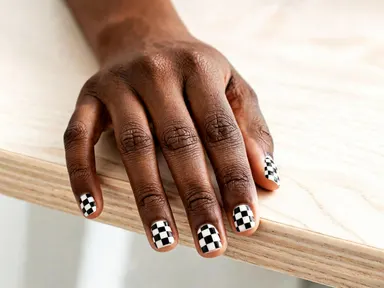
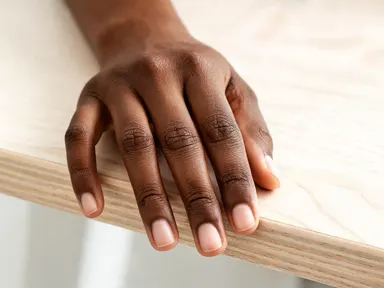
AI Nail Art lets you try on a manicure before you commit to one. Upload a photo of your hand, choose from 24 shades, finishes and nail-art designs in the visual library, and the app places a realistic manicure directly onto your own nails at high resolution. It is built for anyone who wants to preview a colour, compare a glitter finish against a matte one, or plan a nail look for an event without sitting in a salon chair first.
How to use this app
- 1
Upload your file. There is no prompt you have to write.
- 2
Pick a look from the visual library, add a note of your own if you want one, then press Generate.
- 3
Watch your result appear in the gallery within moments.
- 4
Download, share, or generate again with a new idea.
What you can make
Choosing a Colour Before Your Appointment
Upload a photo of your bare hand, browse the library, and compare a glossy deep red against a soft milky white on your actual skin tone. Arriving at the salon with a reference image removes all the guesswork and shortens the consultation.
Planning a Look for a Specific Event
A wedding, a formal dinner or a themed party each calls for a different finish. Try the pearlescent white with its pink-to-blue shimmer for bridal looks, or the deep navy with gold stars for a festive night, and see the result on your own hand before the day arrives.
Comparing Nail Art Designs Side by Side
Deciding between the white marble veining, the leopard spot design and the checkerboard pattern is much easier when each one has been rendered on your nails at high resolution. Save the outputs and compare them in your camera roll before making a final choice.
Sharing Ideas with a Nail Technician
A rendered image of the exact finish you want, on your own hand shape and skin tone, communicates far more precisely than a screenshot from a stranger's profile. Send the output directly to your technician as a reference before your appointment.
Trying Textures You Would Normally Hesitate Over
A mirror chrome finish or a sheer jelly pink can look very different in real life than in a swatch. Seeing either one applied realistically to your own nails lets you decide with confidence whether the texture suits you before any product touches your hands.
Shots to try
Tips for better results
Shoot Your Hand in Good Light
Natural daylight or a bright, even indoor light gives the app the clearest view of your nail edges and skin tone. Harsh shadows across the knuckles or a strong overhead single source can make the applied finish look uneven in the output.
Keep Nails in Clear View
A straight-on shot with fingers slightly spread and nails facing the camera produces the most accurate result. Curled fingers or a side angle where several nails are hidden will reduce how cleanly each finish is applied across all ten nails.
Use a Plain or Neutral Background
A busy background competes with the nail area visually. A plain table surface, a sheet of white paper or a neutral fabric behind your hand helps the app focus its style and colour transfer on the nails themselves rather than surrounding detail.
Try the Same Design on Multiple Photos
If you have photos of your hand in different lighting or at different nail lengths, run the same library option on each. Seeing one finish under warm indoor light and again in cooler daylight helps you judge whether a colour or texture will suit your everyday environment.
When to choose this app
AI Nail Art is the right choice when you want to see a specific finish on your own hand, at high resolution, without writing a single instruction. FLUX Kontext Pro lets users edit images with typed text instructions, which suits general image changes but requires knowing how to describe a nail finish precisely. AI Camera Angle Changer reshots an existing photo from a new viewpoint, a different task entirely. AI Nail Art removes both barriers: the 24-option library does the describing for you, and the output renders directly onto your uploaded hand.
Frequently asked questions
Does the app work on photos of one hand or both hands at once?
The app works on whatever hand or hands appear clearly in the photo you upload. For the most consistent result across all visible nails, a photo where every nail is facing toward the camera tends to produce a cleaner, more evenly applied finish than one where some nails are turned away or obscured.
Will the manicure look realistic on my skin tone specifically?
Yes. The app applies the chosen finish to the nails in your uploaded photo, so the colour sits against your actual skin tone rather than a generic hand. Shades that appear very different on light versus deep skin tones, such as the soft nude beige or the milky white, will render accordingly on your hand.
Can I try more than one design from the library on the same photo?
You can run the same uploaded photo through as many library options as you like, one generation at a time. Many users upload a single well-lit photo and work through several finishes in one session, saving each output to compare them side by side before deciding.
What nail shapes and lengths does the app handle?
The app works across a range of natural nail shapes and lengths, including short rounded nails, medium square nails, and longer almond or stiletto shapes. Nail art designs with painted details, such as the leopard spots or the blue flowers, scale to fit the nail surface visible in your specific photo.
Does the app alter anything else in my photo beyond the nails?
No. The app targets the nails in your uploaded image and leaves the rest of the photo, your skin, your rings, the background and the lighting, unchanged. The output is your original photo with only the nail surfaces restyled to match the library option you selected.
Which file formats can I upload?
The app accepts JPG, PNG, WebP and GIF files. You can drag a file directly into the upload area or select one from your device. There is no need to resize or convert your photo before uploading, though a well-lit image at a reasonable resolution will give you the sharpest output.
How much does it cost?
Each generation costs 1 credit. New accounts get free credits to try it out.
Do I need any editing skills?
No. Upload your photo, pick the look you want from the library, and the app writes the full instruction for you behind the scenes. There is nothing to install and nothing to configure. A small optional box lets you add one line in your own words, but the app works without it.
Can I use the results commercially?
Yes. Content you generate is yours to use, subject to our content licenses.
How long does a generation take?
Most generations finish in under a minute, and you can watch progress live in the gallery.