Made with this app
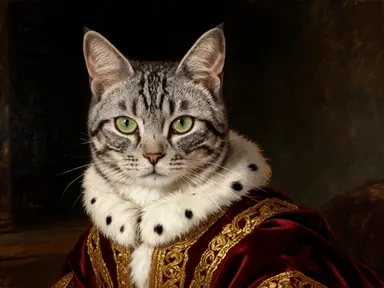
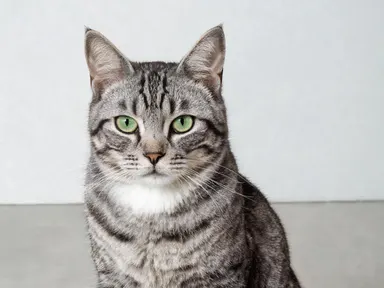
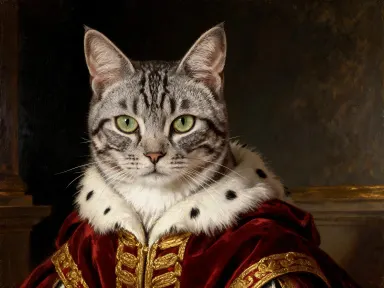
AI Pet Portraits transforms a single photo of your pet into a finished artwork or costumed character, with no prompting required. Upload a JPG, PNG, WebP or GIF, pick a style from the built-in library, and the app handles everything else. The result keeps your pet's face, markings and personality intact across every option, from a regal oil painting to a cyberpunk night scene. It is made for pet owners, gift buyers and social media creators who want a polished, high-resolution portrait without any design experience.
How to use this app
- 1
Upload your file. There is no prompt you have to write.
- 2
Pick a look from the visual library, add a note of your own if you want one, then press Generate.
- 3
Watch your result appear in the gallery within moments.
- 4
Download, share, or generate again with a new idea.
What you can make
Custom Gifts and Prints
A framed impasto oil painting or a leaded stained glass portrait makes a genuinely personal gift. Because AI Pet Portraits renders at 1K and above, the output holds up at print sizes suitable for a canvas, a poster or a greeting card without losing detail in the fur or eyes.
Holiday and Seasonal Cards
Drop in a photo and pick the Santa hat and knitted scarf option or the flower crown for spring. The app places your pet into the seasonal scene consistently, so the same dog or cat looks like themselves wearing the outfit rather than a generic animal placeholder.
Social Media Profile Art
Pet accounts on social platforms benefit from a distinctive visual identity. A pop art screen print or a cel shaded anime illustration gives a feed an instantly recognizable look, and the fixed library makes it easy to post a themed series without any variation in rendering quality.
Milestone and Achievement Portraits
The graduation cap and gown option lets owners mark a pet's adoption anniversary or a training milestone with a keepsake image. The app places the mortarboard and colored hood correctly on your specific animal, making the result feel tailored rather than templated.
Home Decor with a Personal Touch
A Renaissance oil portrait or a Victorian sepia photograph printed large reads as genuine wall art. Each library style carries its own period lighting, palette and texture, so the piece fits a curated interior rather than looking like a novelty photo filter.
Shots to try
Tips for better results
Use a Clear, Frontal Photo
The app keeps faces consistent across styles, so it performs best when your uploaded photo shows the pet's face clearly, with both eyes visible and minimal motion blur. A well-lit shot against a simple background gives the app the most to work with before applying any style.
Match Style to Output Size
Styles with fine detail, such as the graphite pencil drawing or the Renaissance oil portrait, make the most of the 1K and above output resolution. If you are printing large, choose a style that carries detail rather than one built from flat color blocks.
Think About the Background
Every library option includes a defined background, from a starfield to sunlit university steps. If your pet has markings or coloring that blend into a particular palette, pick a style whose background creates contrast. A dark-furred pet reads more clearly against the pale studio background of the 3D animated film option than against the near-black Renaissance backdrop.
Try Seasonal Styles for Series Content
The costume and the scene are both handled by the style you pick, so running the same photo through the Santa hat option and the flower crown option produces the same recognizable pet across seasons. This is useful for anyone building a themed content calendar for a pet account.
When to choose this app
AI Pet Portraits is the right choice when the subject is your pet and the goal is a finished, character-consistent portrait in a specific style. FLUX Kontext Pro lets users edit images with text instructions, which suits open-ended edits on any subject. AI Camera Angle Changer reshoots a photo from a new point of view rather than applying an artistic style. AI Pet Portraits does neither of those things: it takes your animal's likeness and places it inside a curated set of fully realized scenes and art styles, delivering a print-ready result with no instruction writing required.
Frequently asked questions
How many pets can appear in one portrait?
The app is designed around a single uploaded photo per generation. For the most consistent results, upload a photo that clearly features one pet as the main subject. If two pets appear together in the photo, the app will attempt to include both, but face consistency is strongest when one animal is the clear focal point.
Will my pet's specific markings and coloring carry over into the chosen style?
Yes, and that is the whole point of the app. Every style instructs the model to hold the species, the breed, the coat color, the markings in their exact places, the ear shape, the eye color and the face, and to change only the styling, the costume, the medium and the background. A tabby's stripes read as stripes in the watercolor version, and a two-tone husky face is preserved in the oil painting, rendered in that style's palette and brushwork.
What file types and sizes can I upload?
The app accepts JPG, PNG, WebP and GIF files. For the sharpest output, upload the highest resolution photo you have available. A larger input gives the app more facial and coat detail to work with when rendering the chosen style at 1K resolution and above.
Can I use the same photo with multiple library styles?
Yes, and many users do exactly that. Each style choice is a separate generation, so you can run the same photo through the royal court oil painting, the cyberpunk night scene and the astronaut option to compare results or build a themed collection before deciding which to print or share.
Do the costume styles work on all types of pets, not just dogs and cats?
They are not dog-only. The same styles were tested across a dog, a cat and a lop-eared rabbit before the library was built, and each one kept its own species, breed and coat while taking on the costume, which is why there is no pet type to pick: one grid covers all of them. Less common pets are worth a try too, and results are strongest whenever the animal's face is clearly visible and facing the camera.
Is the output resolution high enough to print on physical products?
The app renders at 1K and above, which is sufficient for most print products including greeting cards, posters, phone cases and small canvas prints. If you are planning a very large format print, check the pixel dimensions of the downloaded file against the requirements of your print provider before ordering.
How much does it cost?
Each generation costs 1 credit. New accounts get free credits to try it out.
Do I need any editing skills?
No. Upload your photo, pick the look you want from the library, and the app writes the full instruction for you behind the scenes. There is nothing to install and nothing to configure. A small optional box lets you add one line in your own words, but the app works without it.
Can I use the results commercially?
Yes. Content you generate is yours to use, subject to our content licenses.
How long does a generation take?
Most generations finish in under a minute, and you can watch progress live in the gallery.