Image to Video AI
Upload a still image and generate a short video clip from it: the subject, style and composition stay locked to your picture while the model animates the scene. Arteza hosts the leading image to video engines, Kling, Seedance, Sora, Wan and Veo, in one studio, so you can animate the same frame with several models and keep the best take.
Real stills, animated on Arteza
Every tile starts as the image that was uploaded. Hover or tap to watch the clip it became.
 Source ImageRunway Gen-4 Turbo 4c
The foam head in the nearest pot swells and climbs the rim in a slow rolling boil, fine bubbles breaking across its surface, and the barista's tongs lift the pot clear of the sand just as the foam crests. Camera pushes in steadily as it rises.
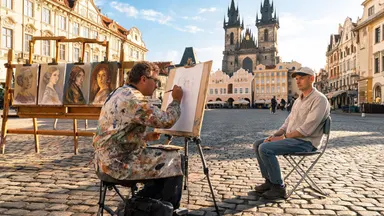 Source ImageKling O1 7c
Rack focus pulls slowly from the soft blur of finished canvases in the background to the painter's pencil moving across the sketchpad in sharp foreground detail, the tourist sitting still while the square glows in the background, camera entirely static.
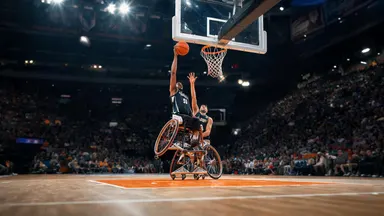 Source ImageSeedance 1.0 Pro 4c
Camera tilts slowly down from the peak of the player's jump, following the ball toward the backboard, the player's expression fierce with effort, crowd noise implied by motion blur of waving arms in the packed stands behind.
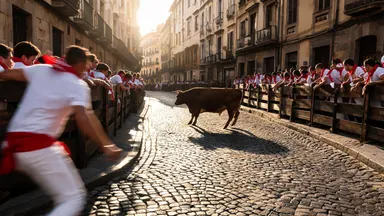 Source ImageMidjourney Video 6c
Camera dollies slowly straight back from the action while the steer completes its corner turn, runners peeling away along the barrier, the cobblestone alley widening to reveal the full gauntlet of the street receding behind the retreating lens.
 Source ImageWan 2.2 3c
The chart continues to unroll slowly under the archivist's careful hands, revealing an ornate cartouche and inked sea-monster illustrations, the reading lamp flickers slightly, camera dollies backward steadily revealing the full length of the oak table
 Source ImageGrok Video 1.5 2c
Hold the camera static and rack focus slowly from the rough alabaster edge in the foreground to the pale balm surface inside the open pot, the creamy texture sharpening into full detail as the stone edge softens to bokeh.
How it works
Upload your image
Bring any still: a photo, a product shot, or something you generated in the image studio. Sharp, well-lit images with a clear subject animate most cleanly.
Describe the motion
Write a short prompt about what should happen, not what is already visible: a slow camera push, hair moving in the wind, a subject turning toward the lens. Pick a model and duration; the exact credit cost is shown before you generate.
Generate and iterate
The model uses your image as the first frame and generates the clip. If the motion is not right, rerun with a tweaked prompt or switch to another model on the same image without leaving the studio.
Models you can use right now
Every model below is live on Arteza with its current credit cost, pulled from the same pricing engine the studio uses at generation time.
Seedance 2.0
Cinema-grade AI video with native audio synthesis
from 19 credits
Frequently asked questions
Which AI model is best for image to video?
It depends on the shot. Kling 3.0 Pro is a strong cinematic default with native audio, Seedance 2.0 adds end-frame control for precise framing, Sora 2 handles longer takes with believable physics, and Wan 2.6 is the value pick for volume work. All of them accept an image input on Arteza, so the reliable answer is to run your image through two or three and compare.
Can I control what happens in the video?
Yes. The image controls how things look and your text prompt controls what happens: camera movement, subject action, mood and pacing. Some models, like Seedance 2.0, also accept an end frame so you can pin how the shot finishes.
What images work best?
Sharp images with a single clear subject, good lighting and some space around the subject. Very busy compositions, heavy text overlays and extreme close-ups tend to warp, because the model has to invent detail it cannot see.
Is image to video free to try?
You get free credits on signup, which is enough to generate and compare clips before deciding whether to buy more. Every model shows its exact credit cost before you generate, so there are no surprises.