現実の静止画がArtezaでアニメ化
すべてのタイルはアップロードされた画像から始まります。ホバーまたはタップして、それがなったクリップを再生してください。
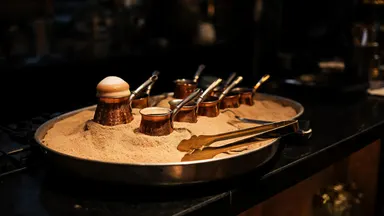 ソース画像Runway Gen-4 Turbo 4c
The foam head in the nearest pot swells and climbs the rim in a slow rolling boil, fine bubbles breaking across its surface, and the barista's tongs lift the pot clear of the sand just as the foam crests. Camera pushes in steadily as it rises.
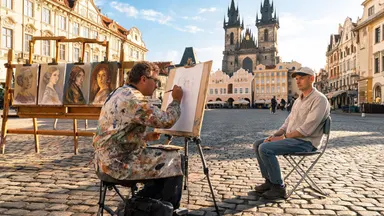 ソース画像Kling O1 7c
Rack focus pulls slowly from the soft blur of finished canvases in the background to the painter's pencil moving across the sketchpad in sharp foreground detail, the tourist sitting still while the square glows in the background, camera entirely static.
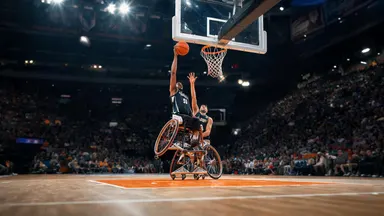 ソース画像Seedance 1.0 Pro 4c
Camera tilts slowly down from the peak of the player's jump, following the ball toward the backboard, the player's expression fierce with effort, crowd noise implied by motion blur of waving arms in the packed stands behind.
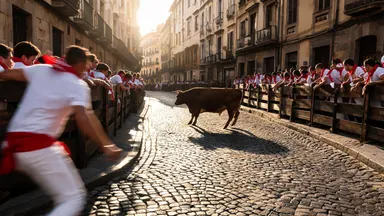 ソース画像Midjourney Video 6c
Camera dollies slowly straight back from the action while the steer completes its corner turn, runners peeling away along the barrier, the cobblestone alley widening to reveal the full gauntlet of the street receding behind the retreating lens.
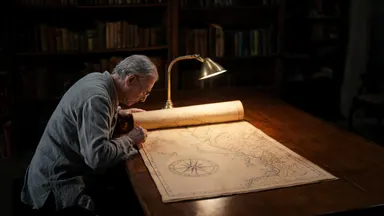 ソース画像Wan 2.2 3c
The chart continues to unroll slowly under the archivist's careful hands, revealing an ornate cartouche and inked sea-monster illustrations, the reading lamp flickers slightly, camera dollies backward steadily revealing the full length of the oak table
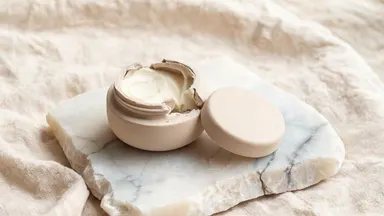 ソース画像Grok Video 1.5 2c
Hold the camera static and rack focus slowly from the rough alabaster edge in the foreground to the pale balm surface inside the open pot, the creamy texture sharpening into full detail as the stone edge softens to bokeh.
仕組み
画像をアップロード
写真、商品写真、画像スタジオで生成した画像など、任意の静止画を使用できます。シャープで照明が良く、被写体が明確な画像が最もきれいにアニメーション化されます。
モーションを説明
何が起こるべきかについて短いプロンプトを書きます。既に見えているものではなく、ゆっくりなカメラの動き、風になびく髪、被写体がレンズに向かって回転するなどです。モデルと期間を選択すると、生成前に正確なクレジットコストが表示されます。
生成と反復
モデルは画像を最初のフレームとして使用してクリップを生成します。モーションが正しくない場合は、プロンプトを調整して再実行するか、スタジオを離れることなく同じ画像で別のモデルに切り替えられます。
今すぐ使えるモデル
以下の各モデルは、スタジオで使用されているのと同じ価格エンジンから現在のクレジットコストを取得して、Artezaでライブ配信されています。
よくある質問
画像からビデオへのAIモデルで最適なものはどれですか?
ショットによって異なります。Kling 3.0 Proはネイティブオーディオ対応の強力なシネマティックデフォルト、Seedance 2.0は正確なフレーミングのためのエンドフレームコントロールを追加、Sora 2は信頼性の高い物理演算で長いテイクに対応、Wan 2.6は大量作業向けのコストパフォーマンス選択肢です。すべてArtezaで画像入力を受け付けるため、確実な答えは画像を2、3つのモデルで実行して比較することです。
ビデオで何が起こるかをコントロールできますか?
はい。画像は見た目をコントロールし、テキストプロンプトは何が起こるかをコントロールします。カメラの動き、被写体のアクション、ムード、ペーシングなどです。Seedance 2.0のような一部のモデルはエンドフレームも受け付けるため、ショットの終わり方を固定できます。
どのような画像が最適ですか?
シャープで単一の明確な被写体、良好な照明、被写体の周りにスペースがある画像です。非常に複雑な構図、テキストオーバーレイが多い画像、極端なクローズアップはモデルが見えない詳細を作成する必要があるため、歪む傾向があります。
画像からビデオへは無料で試せますか?
サインアップ時に無料クレジットが付与されます。これはクリップを生成して比較し、さらに購入するかどうかを決定するのに十分です。すべてのモデルは生成前に正確なクレジットコストを表示するため、予期しない請求はありません。