Made with this app
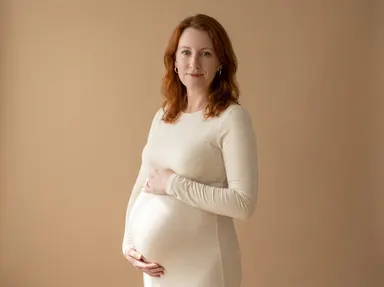
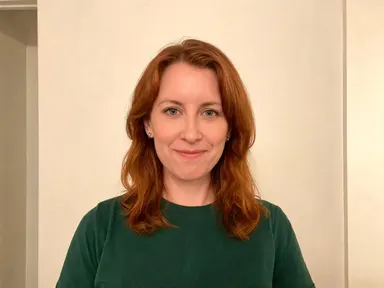
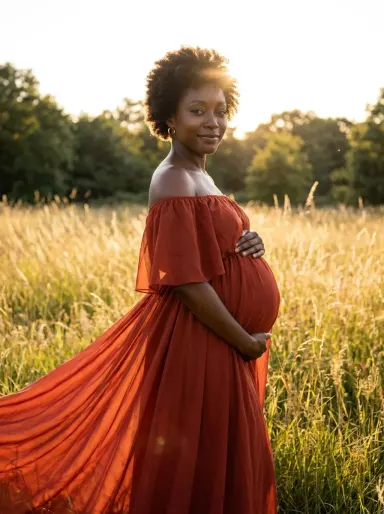
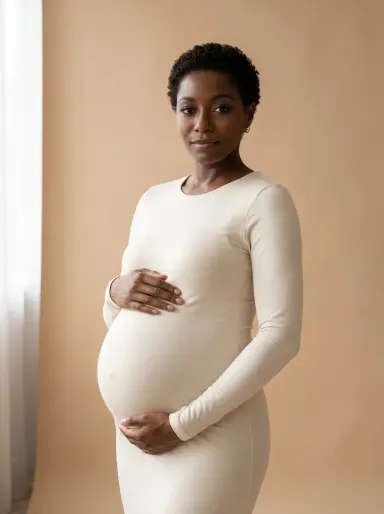
AI Maternity Photos turns a single portrait photograph into a polished, studio-quality maternity image. Upload one clear photo of yourself, choose a moment from the visual library, and the app reimagines you in the final months of pregnancy, dressed and lit exactly as that moment describes. Your face, skin tone and hair stay precisely as they are. The result is a clean photographic portrait that suits everything from a private keepsake to a professional print.
How to use this app
- 1
Upload your file. There is no prompt you have to write.
- 2
Pick a look from the visual library, add a note of your own if you want one, then press Generate.
- 3
Watch your result appear in the gallery within moments.
- 4
Download, share, or generate again with a new idea.
What you can make
A studio portrait without a studio
Not everyone has access to a professional maternity photographer. Choosing a tile such as "The Classic" or "Studio Noir" produces a composed, evenly lit studio portrait that looks indistinguishable from a booked session, at a fraction of the logistical effort.
Outdoor moments in any season
"Golden Meadow", "Autumn Park" and "Spring Blossom" each place you in a distinct natural setting and season. This is useful when the weather, your schedule or your location makes a real outdoor shoot impractical but you want imagery that feels genuinely lived-in and warm.
Exploring styles before committing
If you are planning a real shoot and want to see how different aesthetics suit you before you book, the library gives you ten distinct looks, from the high-key brightness of "White Tulle" to the intimate quiet of "By the Window", so you can make an informed choice.
Shareable announcement imagery
A clean, polished portrait from "Sunset Beach" or "Lace Glow" makes a composed image suitable for sharing with family or using in a printed announcement, without requiring a photoshoot appointment.
Comparing formal and relaxed moods
The library spans formal studio glamour and natural everyday warmth. Generating one portrait with "Ivory Silk" and another with "Autumn Park" lets you compare a polished, posed aesthetic against a looser, documentary feel before deciding which direction fits you.
Shots to try
Tips for better results
Upload a clear, unobstructed face
The app keeps your face exactly as it appears in the source photo. A well-lit image where your face is sharp, facing forward or at a slight angle, and not obscured by shadows or other people, gives the app the most accurate reference to work from.
Let the library tile do most of the work
Each tile defines a complete scene: the outfit, the setting and the light. The optional text box is best used for small adjustments, such as requesting a cooler light tone in "Ivory Silk" or a deeper rust shade in "Golden Meadow", not for replacing the scene entirely.
Set the frame and the quality to match where it will hang
The app opens on a 3:4 portrait frame, which suits prints and framed keepsakes. If the image is destined for a phone lock screen choose 9:16 instead, and for a square social grid choose 1:1. Deciding the frame before you generate avoids cropping away the scene afterwards. Under the aspect row is a Quality row set to HD, which is right for a portrait that will live on a phone or in a message. A maternity portrait that is going to be printed large and hung on a wall deserves 2K or 4K instead; both cost more credits, and both give the print the fine skin and fabric detail that HD leaves behind.
Choose the source photo for its face, not its outfit
The app replaces your clothing entirely with the outfit the tile describes, so what you are wearing in the uploaded photo does not matter at all. Choose the photo where your face is at its clearest and most recognisable, regardless of what you happen to have on.
When to choose this app
AI Maternity Photos does one specific thing with great precision: it places you, recognisably yourself, into a composed maternity portrait. That focus distinguishes it from sibling apps built for different jobs. AI Room Converter works on interior spaces, preserving walls, windows and doors. AI Fashion Model takes garments on hangers or mannequins and places them on a model. Neither of those is designed around a person's own face and identity. When the portrait has to be recognisably you, AI Maternity Photos is the right tool.
Frequently asked questions
How clearly does my face need to show in the uploaded photo?
Your face should be visible from roughly the chest up, in reasonable light, without heavy shadows across it. The app reads your facial features, skin tone and hair from this single image and carries them unchanged into the portrait, so a sharper, better-lit source produces a more faithful result.
Can I appear in the portrait with my partner?
AI Maternity Photos works from one photograph of one person. It is designed to produce a solo maternity portrait. For a portrait that includes a partner, AI Photo Together is built for exactly that job, working from one photo of each person.
Will my glasses or jewellery appear in the result?
The app includes glasses or jewellery only if you are wearing them in the photograph you upload. It does not add accessories that are not already present, and it does not remove ones that are. What you wear in the source photo is exactly what appears in the portrait.
Can I choose my own background or location?
The background is determined by the library tile you choose. Each tile creates a specific scene, a warm studio backdrop, a meadow at golden hour, a beach at sunset. The optional text box can adjust details such as light warmth or a colour within the scene, but cannot replace the setting with your own home or a specific real location.
Can I add text or a name to the portrait?
No. The app produces a clean photographic portrait with no text, lettering, numbers, signage or logos anywhere in the image. This applies to the backdrop, the outfit and the scene. There is no option to add a caption or name, and the optional text box will not produce one.
What does the optional text box actually change?
The optional box accepts one short additional instruction alongside the library tile you have chosen. It is best suited to small, specific details: requesting a particular shade within the outfit colour, asking for slightly warmer light, or noting a detail you would like preserved. It works alongside the tile rather than overriding it.
Do I need any editing skills?
No. Upload your photo, pick the look you want from the library, and the app writes the full instruction for you behind the scenes. There is nothing to install and nothing to configure. A small optional box lets you add one line in your own words, but the app works without it.
Can I use the results commercially?
Yes. Content you generate is yours to use, subject to our content licenses.
How long does a generation take?
Most generations finish in under a minute, and you can watch progress live in the gallery.